WILMINGTON, MA — The below notice was published on the Wilmington Public Schools website yesterday. I’ve been asked to help spread the word about this excited news!
Wilmington Public Schools is preparing Connect 5 (our Auto Call/Email system) to accept Text Messages as a type of communication. So far, we have prepared a new field in Aspen called, “Text Number” so that it reflects Contact 1’s mobile number. (If a number was already provided via the electronic update process, that number took priority and is the one listed).
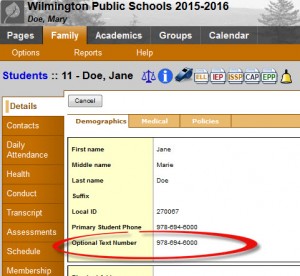
To see which number would be used for your child, log in to Aspen and click the, “Family” top tab, then on your student’s, “Details” page. The first section will show a line called “Optional Text Number.”
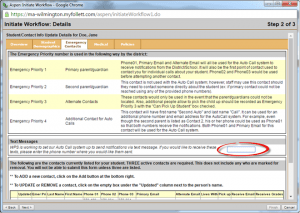
To opt out or change the number, you can use the electronic Student/Contact Update process in Aspen. To quick start, use the link in the announcement on your home page. Once you select your child, move to the “Emergency Contacts” tab and delete (to opt out) or change the number listed for the “Text Messages” section. Then, click on, “Next” until you get to the confirmation screen and click on, “Finish”. For full instructions on using the wizard to submit information electronically, please check out either the video or step by step PDF guide under the Tutorials section on our Help page.
Like Wilmington Apple on Facebook. Follow Wilmington Apple on Twitter. Subscribe to Wilmington Apple’s daily email newsletter HERE. Got a comment, question, photo, press release, or news tip? Email wilmingtonapple@gmail.com.
 Wilmington Apple